Payble
Pay your Tiaki Wai water bill with Payble, our new online payment option for Lower Hutt customers to make it easy for you to pay your water bills. It’s easy, fast and free to use. You can set your bills to be paid automatically in full on the due date with a credit card, debit card or a bank account. Alternatively, you can choose to pay in smaller, more frequent payments, and receive helpful payment reminders by email or SMS to your mobile number.
With Payble, you choose how and when you pay
- Choose how you pay – full or part payments
- Decide which day to make your bill payments, for example to align with your pay day
- View balances and upcoming payments
- Access and update your payment details anytime and anywhere, via web or mobile
Autopay
Schedule your bill payments to be made in full on the date they are due, using a credit card, debit card or bank account.
Flexible payment plans
Schedule weekly, fortnightly or monthly payments to get ahead in advance of your next bill due date. Choose which day to pay, skip a payment if needed or pay early.
Make one-off payments
Make one-off payments towards your water bill at any time. You can choose to pay the full amount or make a part payment.
Ready to get started?
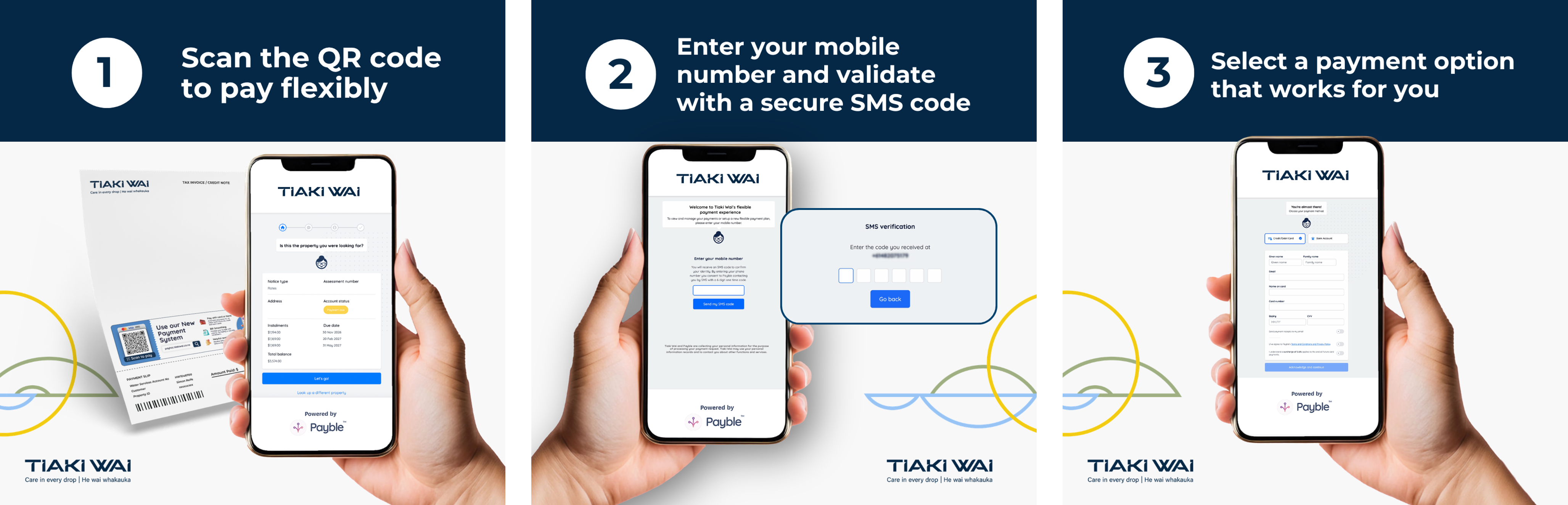
- Scan the QR code on your Tiaki Wai water bill, or visit the Payble website
- Enter your mobile number and validate with a secure SMS code
- Select a payment option that works for you
How do I set up my Payble account?
Setting up your water bill payments through Payble is easy.
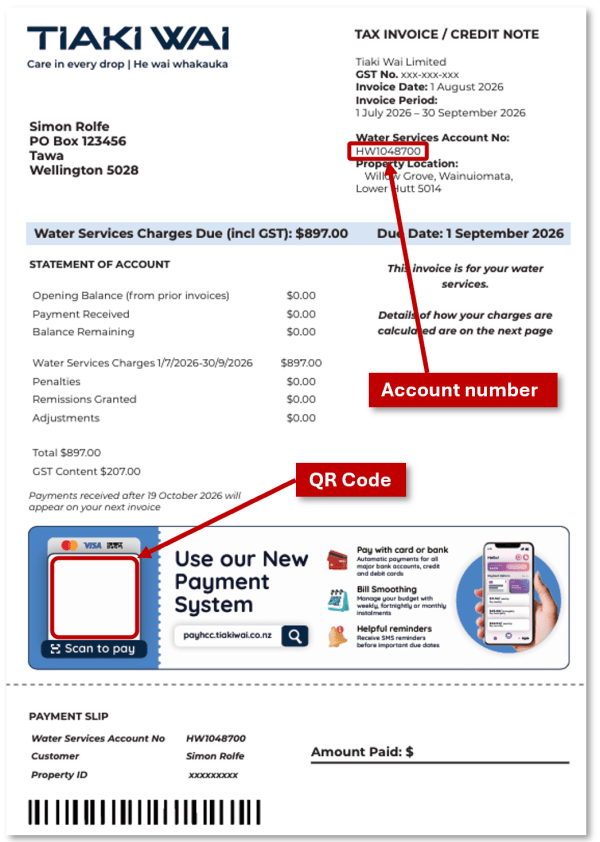
Your water bill has a personalised QR code – scan it using the camera on your phone to register on Payble. We’ll ask you for your mobile number or email so we can send you a confirmation code to login.
Once your mobile number or email is confirmed you can:
- Choose how to pay by selecting one of three options – autopay, flexible payment plan or one-off payment
- If you select flexible payment plan, choose a schedule that works for you (weekly, fortnightly or monthly)
- Enter your payment method details
- All done! You’ll get a text or email to confirm your payment schedule.
How to register on Payble using your laptop or PC:
- Visit the HCC Payble page (available in late July) and enter your mobile number or email address
- Look up your account using your account number
- Choose how to pay, as above.
What if I’m already paying my Hutt City Council rates by Payble or direct debit?
The Tiaki Wai Payble system is completely separate to the Hutt City Payble system, or any rates payments you might already be making.
You will need to register on the Tiaki Wai Payble system as a new customer and set up your water bill payments there, including setting up a direct debit if you choose to.
What are the terms and conditions for using direct debits?
Refer to Direct Debits Authority for terms and conditions.
What payment options are available on Payble?
Payble lets you choose how and when you pay. Payments can be set up to be paid from a bank account, credit card or debit card. You can:
- Autopay – pay your water bill in full. Set up to pay your current and future water bills in full on their due dates
- Flexible payment plans – set up a payment schedule to make weekly, fortnightly or monthly direct debit payments to smooth the amounts you pay and get ahead of your next water bill
- Make a one-off payment – pay a one-off amount towards your water bill at any time.
What happens once I’ve set myself up on Payble?
- Any autopay or flexible payment plan that you set up will remain active, unless you cancel it
- You will get a reminder before each payment is deducted
- You can check the balance owing on your water account at any time.
How do I change my payment method or schedule?
To make changes to your payment method or schedule:
- Scan the QR code on your water bill, or visit our Payble website and login
- Click on Active plans, locate the plan you wish to change, and click View details
- Use the options under Manage to:
- change your payment method – add your new bank account or card details
- change the next payment amount or skip the next payment - Payble will automatically adjust the remaining payment schedule based on the balance owing
- You will receive a notification confirming the changes have been made to your payment method or schedule.
Can I pay a scheduled payment early, or pay the remainder of my balance?
Yes. When viewing your payment plan, a “Pay early” button will appear next to your next upcoming payment.
Do I have to use Payble?
No, the other payment methods available are:
- Online banking
- Phone banking
- Over the counter at some NZ Post stores.
Refer to Hutt City billing for further details on payment options.
I have multiple water accounts in Lower Hutt. Can I have them all under one Payble account?
Yes, you can have multiple accounts with their own payment schedules under one Payble login.
I have multiple water accounts across the wider Wellington region. Can I have them all under one Payble account?
No, the only area in the wider Wellington region to support the use of Payble for water bills currently is Lower Hutt. Other areas in the region will have Payble payment capability in the near future.
Can I pay my Water Services and Water Usage bills under the same payment plan?
No, your Water Services and Water Usage accounts are separate and will receive separate bills due at different times. You will need to set up a payment plan for each account.
Note: Water Usage bills are only applicable to properties that have an existing water meter installed.
What do I do if I sell my property?
If you have sold your property, you will need to cancel your water account payment plan in Payble before property settlement.
Can I use a joint bank account in Payble?
Yes. You can set up a Payble payment plan using a joint bank account, as long as you have sole authority for the account.
Most personal joint bank accounts in New Zealand allow each account holder to transact independently. If this applies to your account, you can confirm this during sign-up by selecting that you have sole authority to operate the account.
Note: The wording of the agreement “I confirm I have sole authority on the nominated account” can be confusing. This is a bank mandated agreement and terminology. It does not mean you are the only individual who has authority to approve transactions. Rather, it means you as a sole person has authority to use the account (and so does the other account holder).
Can I use a bank account in Payble that requires multiple signatories?
No, Payble is not an option for these types of bank accounts.
Seven-Day banking
Banks process payments seven days a week. Tiaki Wai only processes payments on business days (Monday to Friday, excluding public holidays).
If a payment falls on a weekend or public holiday, direct debits will be processed on the next business day. Manual weekend payments will be recorded on the day they were paid, but processed on the next business day.
Due dates for water bills remain the same. If a due date falls on a weekend or holiday, the next business day becomes the effective due date.
What information do you store about me, and how is it kept secure?
When you make a payment to Tiaki Wai or set up a payment plan through Payble, you may provide payment details such as bank account, credit card, or debit card information (your "Payment Methods"). Keeping this information secure is our top priority.
The Payment Method (which is tokenised in the case of credit and debit card details) and the Payment Option (including any standing authority) used to make a payment are stored securely:
- Payble only ever holds card tokens, never your raw card numbers
- Your real card information is securely stored by an industry standard payment gateway, which operates under bank-grade security standards
- Tokens are useless if intercepted, as they cannot be reversed to reveal your original payment details
- All stored Payment Methods are held securely and in accordance with Payment Card Industry Data Security Standard (PCI DSS, the mandatory global security framework for all entities that store, process, or transmit cardholder data) and otherwise as required by New Zealand law.
Payble meets all relevant New Zealand legal requirements and is also ISO/IEC 27001 Certified and SOC2 Type 2 Audited. See Payble's full terms here: https://payble.com.au/privacy-terms.
Once I set up a Payment Plan, does it rollover to my next bill automatically?
Yes. Once a payment plan is set up it will continue until you cancel it. Once you have completely paid your current water bill balance, the plan will be “paused”. It will then restart again when your next bill amount has been loaded into Payble, with the same payment frequency and payment method.
Note: if you have chosen to “get ahead” by paying regular amounts ahead of your next bill then your payment plan always remains active.
Do I receive an email confirmation when I make a payment in Payble?
Not always. In some cases where the payment you have made is in real-time in Payble, you will be provided with an on-screen confirmation of success, so an email confirmation is not provided. You will be sent an email receipt if you have chosen to receive those via email. Alternatively, you're able to download the receipt from Payble on the payment screen.
How do I change my email address?
If you have registered on Payble using your email address, you will not be able to change it. You will have to:
- Cancel any existing payment plans
- Re-register with your new email address
- Set up any payment plans and payment methods again.
If you registered on Payble using your mobile number, you can change your email address by using Options > Edit profile, then Manage > Edit Details.